
Description
GetCID & Confirmation ID for Microsoft Products: Office and Windows
Obtaining a Confirmation ID (CID) is a critical step for activating Microsoft Office and Windows products. Whether you are activating Office 2021, 2019, 2016, 2013, 2010, or Windows 11, 10, 8, 7, or Server editions, the process is straightforward with the right guidance and tools. This guide will help you understand how to get a Confirmation ID using both traditional methods and a fast, hassle-free online alternative.
 What is a Confirmation ID (CID)?
A Confirmation ID is a unique identifier provided by Microsoft during the activation process. It validates that your software is genuine and properly licensed. The CID is used along with an Installation ID (IID), which is generated when you enter your product key in the Activation Wizard. Activating with a CID ensures that your Office or Windows product is fully functional and compliant with Microsoft licensing policies.
How to Obtain a Confirmation ID for Microsoft Products
1. Phone Activation for Microsoft Office 2021,2019,2016 with Confirmation ID:
Microsoft Office requires activation to unlock its features. Here’s how to get a CID for various Office versions:
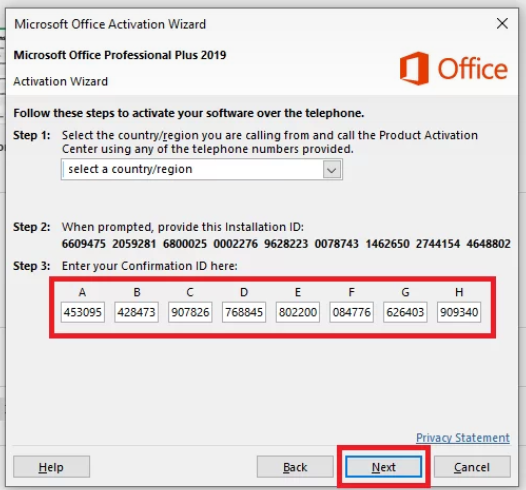
- Launch the Activation Wizard:
- Open any Office application, such as Word or Excel.
- Navigate to
File > Account > Change Product Keyand enter your product key. - The Activation Wizard will prompt you to activate the product.
- Select Telephone Activation:
- Choose “I want to activate the software by telephone.”
- The wizard will display a unique Installation ID (IID).
- Contact Microsoft Support:
- The wizard will provide a phone number based on your region.
- Call the number, provide your IID, and the representative will generate a CID for you.
- Enter the CID:
- Avoid calling the activation number for a CID; it’s often unreliable, time-consuming, and prone to errors. Instead, use the faster and hassle-free GetCID tool, which generates a CID in seconds.
- Using a fast online Get CID Generator tool is a more efficient option. Simply enter your IID into the tool, and it will generate a CID within seconds, saving you the time and hassle of calling support.


2. Phone Activation for Microsoft Windows 10/11/8/9 with Confirmation ID
Windows products also require activation to access updates and essential features. Follow these steps for activation:
- Open the Activation Wizard:
- Press
Windows + R, typeslui 4, and press Enter to launch the Telephone Activation Wizard.
- Press
- Select Your Country/Region:
- Choose your location to get the relevant phone number for activation.
- Get the Installation ID:
- The wizard will display an IID. Write it down or take a screenshot.
- Generate the Confirmation ID:
- Avoid calling the activation number to get a CID; it’s often unreliable, time-consuming, and prone to errors. Use a faster and hassle-free GetCID tool instead which get Generate CID in few seconds.
- Enter the Confirmation ID:
- Input the CID or Confirmation ID back into the wizard and click Next to complete the activation process.

- Input the CID or Confirmation ID back into the wizard and click Next to complete the activation process.

Supported Microsoft Products
The Confirmation ID process is applicable for a wide range of Microsoft products, including:
- Office Versions: 2021, 2019, 2024, 2016, 2013, and 2010.
- Windows Versions: 11, 10, 8, 7, and Windows Server.
- Other Products: MS Project, Visio, and more.
Why Use the GetCID Tool?
While the traditional method of calling Microsoft support works, it can be time-consuming and inconvenient. Avoid calling the activation number to get a CID; it’s often unreliable, time-consuming, and prone to errors. The GetCID tool offers a faster and easier alternative with these benefits:
- Speed: Generate a CID in less than 15 seconds.
- Convenience: No need to wait on hold or deal with non-working phone numbers.
- Reliability: Works for all versions of Office and Windows, including older editions.
- Ease of Use: Enter your IID into the tool and get a valid CID instantly.
Step-by-Step Guide to Using the GetCID Tool
- Open the Activation Wizard in Office or Windows.
- Choose Telephone Activation and note the Installation ID (IID) displayed.
- Visit the GetCID tool online.
- Enter your IID into the tool and click Get Confirmation ID.
- Copy the generated CID and input it back into the Activation Wizard.
- Click Next to complete the activation.
Common Activation Errors and Solutions
If you encounter activation errors like 0xc004f050, 0xC004C060, or 0xc004c008, here’s what you can do:
- Verify Your Product Key: Ensure it matches your version of Office or Windows.
- Run the Troubleshooter: Go to
Settings > Update & Security > Activationand click Troubleshoot. - Use the GetCID Tool: Avoid the hassle of phone activation and resolve errors by generating a CID online.
Benefits of Activating Your Microsoft Product
Activation ensures that your software is genuine and fully functional. It unlocks premium features, ensures regular updates, and provides access to support services. By activating with a CID, you can enjoy uninterrupted use of your Microsoft product without any licensing issues.
Activating Microsoft Office and Windows products with a Confirmation ID is essential for a seamless user experience. While the traditional phone activation method works, using the GetCID tool is a faster, more reliable alternative. Whether you’re using Office 2021 or Windows 11, this tool simplifies the process and saves you valuable time. Activate your Microsoft products today and enjoy their full potential!


Monali singh –
Best & fast way to activate office with CID
Arun Gopinath –
Thanks,
Best site to Phone Activation for Microsoft Office 2021,2019,2016 with Confirmation ID
Ravi Kapoor –
Thanks. It helps me to solve my office 2021 activation wizard error using this GETCID tool- https://mskey.in/getcid-free-in-india/
Mythili Gopinath –
Bets Get CID Generator tool in India
Radhika Agarwal –
got the code to activate my Microsoft Office 2029
Pooja Kapoor –
Got the Code in seconds, it’s very fast – https://mskey.in/getcid-free-in-india/
just need to give Installation id and get Confirmation id in seconds
Balaji Nair –
This is my second order, Recommended for everyone
Sanjay Agarwal –
Instate of wasting time on calls to care for getting confirmation id just pay and get it
very easy and fast
Anjali Gupta –
Nice site to Get Confirmation ID for windows activation